
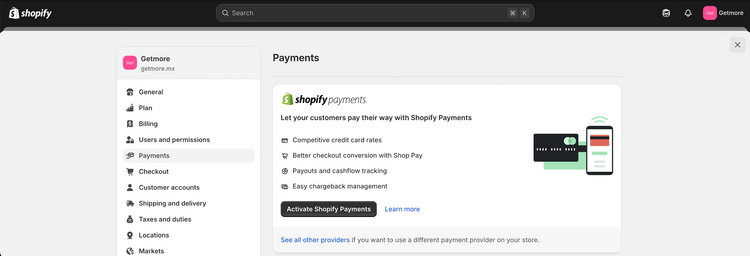
After a long wait, Shopify Payments is now available in Mexico, unlocking new features and removing limitations that previously complicated payments. With this integration, both businesses and customers can enjoy a more streamlined and efficient experience.
If you're looking to improve your payment gateway, here's everything you need to know.
Shopify Payments fees in Mexico
Fees vary depending on your Shopify plan and location. The good news is that by using Shopify Payments, you'll only pay this payment gateway's fee, eliminating the additional transaction charges that apply with other payment methods.
Example of savings with Shopify Payments:
- If you use Shopify Advanced and migrate to Shopify Payments, you'll stop paying the 0.6% transaction fee plus the fee from an external payment gateway. You'll only pay 3.30% + MXN 3 per transaction.
- However, if you use PayPal, for example, you will still pay the 0.6% transaction fee , plus PayPal's 4.5% fee.
You can review the specific costs of your plan on the Shopify plans and pricing page for Mexico or consult the following table:

You can also view this information from the Shopify control panel by following these steps:
- Go to Settings in your Shopify dashboard.
- Select Payments and then click Manage within the Shopify Payments section.
- Check the applicable fees based on your location and Shopify plan.
What is Shopify Payments?
Shopify Payments is Shopify 's built-in payment gateway. In other words, it's the easiest way to accept payments in your store without needing to set up external services like PayPal or Stripe.
Furthermore, you can accept credit cards, debit cards, and other payment methods without additional transaction fees (beyond standard processing fees). It also allows you to manage everything from a single location, streamlining payments and eliminating intermediaries.
The best part is that it's easy and quick to activate, and you can receive payments in a matter of days.

Advantages of using Shopify Payments Mexico
1. Simplifying international sales
With Shopify's Markets feature, managing international sales becomes simpler. You won't need to create separate stores for different currencies and prices. This feature simplifies administration and expands your global reach.
- With Shopify Payments : The entire international sales process is seamlessly integrated, eliminating the need for complicated setups.
- Without Shopify Payments : You'll have to rely on third-party payment providers, so management can be complicated.
2. Variety of payment options
Offering payment options is key to improving conversion rates and your customers' shopping experience. Shopify Payments allows payments with major credit cards such as Visa, Mastercard, and American Express, among others.
- With Shopify Payments : Customers can pay quickly and securely with the most popular cards, increasing the likelihood of conversion.
- Without Shopify Payments : Depending on the payment provider you use, you could limit the available payment options, which could negatively impact the shopping experience and reduce sales.
3. Integrated payment methods
- With Shopify Payments : It offers a wide range of integrated payment methods, including credit and debit cards, Apple Pay, Google Pay, and more.
- Without Shopify Payments : You'll need to integrate a third-party payment provider (such as PayPal, Stripe, etc.), which may limit the available payment methods.
4. Payments integrated into the checkout
The checkout experience is essential for a great shopping experience. With Shopify Payments, the checkout process stays within your store window, without the need for a pop-up or redirection to another site.
- With Shopify Payments : Payments are fully integrated at checkout , which improves the user experience, reduces friction in the purchase process, and increases the likelihood of completing the sale.
- Without Shopify Payments : Depending on the third-party payment provider, the customer could be redirected to a pop-up window or another site, which could lead to distrust or cart abandonment.
5. Automatic and easy setup
By activating Shopify Payments, your store is ready to accept payments without complicated setup. The process is simple and accessible.
- With Shopify Payments : Setup is automatic and user-friendly, allowing you to start selling quickly and easily.
- Without Shopify Payments : Using a third-party payment provider requires advanced setup and user-unfriendly technical processes, which can delay your store launch.
6. Fast transfers
Your sales profits are transferred directly to your bank account, helping you maintain a stable and consistent cash flow.
- With Shopify Payments : Transfers are fast and hassle-free, ensuring your funds are available in no time.
- Without Shopify Payments : With third-party providers, transfers can take longer and may involve additional fees.
7. Elimination of additional fees
One of the great benefits of using Shopify Payments is the elimination of additional fees on sales.
- With Shopify Payments : There is no additional commission charged on sales, only the standard payment processing fee depending on your current plan.
- Without Shopify Payments : Shopify charges an additional transaction fee (up to 2%) for each sale, plus any fees charged by third-party payment providers, increasing operating costs.

Stripe and Shopify
Before Shopify Payments arrived in Mexico, Stripe was one of the most popular options for accepting online payments. This platform offers various tools that easily integrate with websites and apps, allowing businesses to receive payments from international customers. However, it operated as a third-party service. Now, it's fully integrated, resulting in more competitive rates and the ability to manage payments and reports from a single location.
Detecting chargeback fraud in Shopify
Chargeback fraud is a major concern for online stores. However, you should know that Shopify has a system that detects potential fraud in orders based on certain factors. In the Orders section of your Shopify Admin, you'll see an alert when the risk of fraud is medium or high. Within the order details, the notification will appear as follows:

Fraud detection checklist
If you have a Shopify store, it's important to follow this checklist to prevent chargeback fraud: Review Shopify's built-in fraud analysis, but don't rely solely on it. Despite the platform's system for detecting these cases, its effectiveness isn't infallible.
Additionally, check for suspicious details such as unusual orders, direct contact with the buyer, strange emails, and repetitive or unreliable shipping addresses. Also consider the time of the order, multiple payment attempts, and unusual urgency in delivery. Finally, train your team to identify signs of fraud and act promptly.
CLICK HERE to learn more about chargeback fraud.
How to activate Shopify Payments in Mexico?
- Within the platform, click on Settings.
- Now go to the payments section.
- In the Shopify Payments section, click Activate and follow the instructions to complete the setup.
Considerations regarding the currency (MXN)
If you sell in Mexico, Shopify Payments only processes payments in Mexican pesos (MXN). However, your customers may see prices in other currencies, depending on your store settings.
However, it's important to verify that the currency of your bank account matches the currency of your payments to avoid additional currency conversion fees.
Payment times in Shopify Payments
The payment period is the time it takes Shopify to transfer your sales funds to your bank account. In Mexico, this period is seven business days from the date the payment is captured.
Weekend sales
If you make sales on Friday, Saturday, or Sunday, the funds from those transactions are pooled and paid out together.
Note : Although Shopify sends the funds quickly, it can take banks 24 to 72 hours to reflect the deposit in your account.
Minimum amount
The minimum amount to receive a payment is 10 MXN . If your balance is less than this, the money will remain pending until you accumulate the necessary amount for the transfer.
How to review your payments in Shopify Payments Mexico?
To ensure everything is in order with your earnings, you can check your payment status in your Shopify dashboard. There you'll see pending, in-transit, completed, or failed transfers.
Conclusion
With Shopify Payments, managing your store's payments is easier. If you haven't activated it yet, we recommend evaluating it to improve your customers' shopping experience and streamline your business operations.
If you have questions about how to get the most out of Shopify, we at Getmore are here to help. Contact us to take your store to the next level!
