
On June 17, 2026, Shopify launched its Spring '26 edition with over 150 updates for online stores, retail, payments, agentic commerce, and developer tools. It's the largest concentration of changes this year and covers practically all areas of the platform.
Instead of going feature by feature as it appears on the official page, here we organize it by themes so you can identify what is relevant to your business.
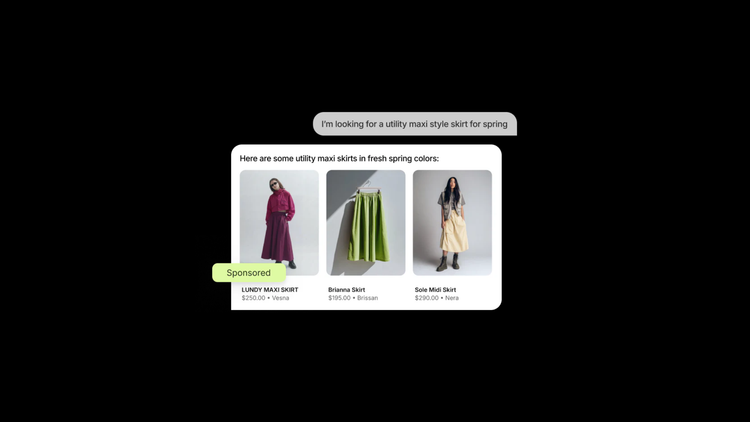
Shopify Catalog and Agentic Commerce: Your products on ChatGPT, Google, and Copilot
The biggest bet of this edition is to make your products visible where people are shopping today, which is increasingly within conversations with AI tools.
Central to all of this is Shopify Catalog, which we already analyzed in detail in our Agentic Storefronts blog. In this edition, the most relevant data Shopify confirms is that syndicated data through Catalog generates twice the conversion in AI chats versus unstructured products.
Catalog takes your product information, automatically enriches it with machine learning, and distributes it to all AI channels in a single setup, without additional apps. View Shopify Catalog help doc →
What's new in this edition specifically:
- Shopify added a unified panel within the admin to manage your Agentic Storefronts in one place. From there, you can view orders, sales, and conversions generated from AI channels, and there's a smart search function that shows the most frequent questions people ask about your category in AI tools, including which ones you already appear in and which ones you don't. View in Shopify Editions →
- Checkout within Microsoft Copilot is now available, and will soon come to Meta ads, all running on the Universal Commerce Protocol that Shopify developed in conjunction with Google. Customers can complete their purchase with Shop Pay directly within the conversation. Help doc for checkout in AI channels →
- There is also a new Catalog API with image search, product queries by URL or ID with real-time pricing and availability data, and the ability for agents to show variants, media, and offers from multiple vendors directly in the conversation.

B2B and wholesale: automatic payments and more discount flexibility
This edition brings several concrete updates for businesses with distributor programs or wholesale sales.
Automatic collection of B2B payments with Shopify Flow
You can now set up a Flow action that automatically collects from saved B2B customer payment methods, triggered by due date, order fulfillment, or invoice type. This eliminates manual payment tracking on net terms and works with previously saved cards or bank accounts. View in Shopify Editions →
Discounts by region, company, or location
You can now limit a discount to a specific market, a distribution location, or a B2B segment, instead of it automatically applying to all your customers. This is especially good for brands that manage different prices per channel or geography.
Combine multiple discounts in the same order
Previously, applying a loyalty discount and a seasonal discount at the same time required workarounds with Scripts or Functions. Now multiple discounts can be stacked on the same line item using tags that the merchant configures. Stacking is not automatic; it requires discounts to share a specific tag that you define in the settings.
Metaobjects in checkout functions
For stores with custom product logic (SKU equivalences, attribute-based discount rules, catalog conditions), metaobjects can now be queried directly within checkout functions to build that logic without relying on external solutions.
Billing address and PO number validation at checkout
Relevant for brands selling to corporate buyers who need a purchase order number or specific billing address to process payment in their systems.

Online store: native testing, variants by channel, and smarter search
Rollouts: A/B testing and scheduled launches without apps
Rollouts allows you to schedule the launch of an entire theme or checkout configuration to a specific date, gradually roll out to a percentage of visitors, or run a real A/B test between two different versions of the store.
When you create a rollout, Shopify automatically generates a copy of your published theme, so you can continue editing your live store independently while the experiment remains active. Multiple simultaneous rollouts can also be run, as long as they don't overlap on the same traffic segment.
-
Important limitations worth knowing: Rollouts works at the section level within the theme editor, not with changes in Liquid files. It also does not support price testing, discount logic, or checkout variants (for which third-party tools are still necessary). Experiments do not show confidence intervals or segmentation by visitor type.
View in Shopify Editions →
Publishing variants by channel and by market
The same product can have different variants published on different channels, for example, sizes available only in retail, colors available only in the online store, or specific prices by region. Shopify Flow can automate the publishing or unpublishing of variants based on triggers such as out of stock or restock.
- There is an important architectural change here: it can no longer be assumed that a product's publication applies equally to all its variants across all channels; now it must be reviewed at the variant-per-channel level.
Search with typo tolerance
The internal storefront search now handles typos and unusual phrases and still returns relevant results. This is a platform-level change that benefits any theme without the need for additional configuration.
Redesigned customer accounts
Clearer navigation, updated design, recommendations for new shoppers, customizable login with brand logo and design, and customers now remain logged in for up to one year. There's also support for syncing profiles from identity providers like Auth0 and Azure ID. View in Shopify Editions →

Checkout and payments: conversion, more local options, and Shop Pay for any platform
The checkout was redesigned to improve conversion, with easier-to-scan shipping options on mobile, a more visible payment button, and less overall scrolling. Managed payment methods were also added that dynamically order payment options based on which one is most likely to convert for each specific buyer, based on their history and location.
Shipping and in-store pickup within the same checkout
A customer can choose shipping for one item and in-store pickup for another, within the same order, without having to split the purchase into two transactions.
Gift cards in local currency
You can now sell and redeem gift cards in the local currency of each market. Conversion is handled automatically and works from a single store with multiple active markets. View in Shopify Editions →
Shop Pay now on any platform
Brands that don't use Shopify as their online store can offer Shop Pay at their checkout, with access to a network of over 250 million buyers who already have an active account.
Expanded local payment methods.
New local payment options are available for markets in Europe (Bancontact, iDEAL, Twint, Blik, MobilePay, among others). For Mexico, Meses Sin Intereses (interest-free installments) can now be configured natively within Shopify Payments.
Sidekick and analytics: more capabilities within the admin
Sidekick now works with third-party apps like Klaviyo, Judge.me, and Smile, meaning you can ask it to do things within those apps without leaving the Shopify admin. It also works from any screen of the mobile admin, asks follow-up questions to clarify more complex tasks, and can continue processing tasks in the background while you do other things. There's additional support for Apple Watch. View in Shopify Editions →
In analytics, automated daily suggestions based on your store's data, annotations explaining why a specific metric changed (such as a theme deploy, app installation, or product change), and new chart types within the admin were added.

Retail and POS
POS v11 arrives as the fastest version of Shopify POS yet, with speed improvements of up to a minute per complex transaction thanks to the cart remaining visible throughout the checkout process and quick access to search for recently used customers, products, and discounts. You can also combine returns, exchanges, and new sales within the same cart.
Other additions in retail
QR codes generated from the admin to apply in-store discounts, support for pickup at any retail location, offline mode to continue selling when internet connection is lost, and a new handheld device that functions as a terminal when connected to its base. View in Shopify Editions →
A deadline that is not optional: Shopify Scripts stops working on June 30
This is not new in this edition, but it coincides with the launch and is urgent. Shopify Scripts, the system that many Shopify Plus stores used to customize discounts, shipping, and payment rules, will stop executing completely on June 30, 2026. Script editing was already blocked as of April 15.
If any logic in your checkout still depends on Scripts and is not migrated to Shopify Functions before that date, it will stop applying without any visible notice in the store. Migration is not automatic and requires rewriting the logic. If you have active Scripts, it's worth auditing them this week.
Frequently Asked Questions about Shopify Editions Spring '26
What is Shopify Editions?
It's Shopify's biannual publication with all the new platform updates. The Spring '26 edition was launched on June 17, 2026, with over 150 updates across online store, payments, checkout, agentic commerce, retail, and developer tools. You can view the full edition at shopify.com/editions/spring2026.
What is Shopify Catalog and what is it for?
Shopify Catalog is the system that automatically structures and enriches your product data so that it is discoverable on AI channels like ChatGPT, Microsoft Copilot, and Google AI Mode. It is configured once and distributed to all channels automatically. According to Shopify, data syndicated through Catalog generates twice the conversion in AI chats. View the official documentation →
What are Rollouts in Shopify?
Rollouts is Shopify's native tool for scheduling theme changes, gradually launching to a percentage of traffic, or running A/B tests between two different versions of the store, without the need for third-party apps. It works at the section level of the theme editor, not with Liquid code changes. It is accessed from Markets > Rollouts in the admin.
What's new for B2B in Shopify?
The most concrete updates are automatic payment collection with net terms via Shopify Flow triggered by due date or order fulfillment, discounts that can now be limited to specific regions, companies, or locations, the ability to stack multiple discounts on the same order, and the use of metaobjects directly in checkout functions for custom catalog or pricing logic.
What happens if I have active Shopify Scripts in my checkout?
On June 30, 2026, Scripts will cease to function entirely. Editing has been blocked since April 15. If you have discount, shipping, or payment logic running on Scripts, that logic will stop being applied on that date without visible notice. You must migrate to Shopify Functions before June 30.
Does Shopify Agentic work for stores in Mexico?
Product discovery does work for any store that can ship to buyers in the United States, regardless of where the store is located. The integrated checkout within the AI channel is currently in early access in the US. For more details on eligibility requirements, you can check out our Shopify Agentic Storefronts blog.
Do I need to implement all the updates in this edition?
No. Shopify editions are a catalog of what's available, not a list of mandatory to-dos. The most helpful approach is to identify what solves a specific problem you already have in your operation and start there.
Keep reading about the Shopify ecosystem:
