
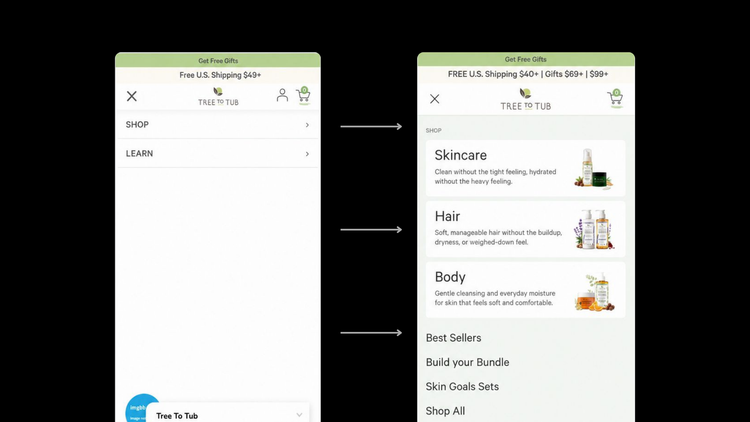
Cuando alguien abre tu tienda en el celular, lo primero que ve es el header. Lo segundo que toca es el menú.
El 69% de los usuarios usa la navegación como su método principal para encontrar productos. En mobile, eso es el menú. Es el elemento con más interacción en toda la tienda y, al mismo tiempo, uno de los menos optimizados.
El dato que lo resume todo: la tasa de conversión en mobile promedia 1.53% frente al 3.36% en desktop. Mobile genera entre el 68% y 78% de todo el tráfico de ecommerce en 2026, pero convierte casi a la mitad. Una parte importante de esa brecha no tiene que ver con la intención del comprador. Tiene que ver con la fricción que encuentra al navegar.
El menú es una de las fuentes principales de esa fricción.
Durante años diseñamos los menús mobile como mapas del sitio
El error más común no es técnico. Es de enfoque.
El menú de una tienda en mobile suele construirse respondiendo la pregunta equivocada: ¿qué páginas incluimos? Entonces entran todas las colecciones, todas las categorías, las páginas de información, los enlaces secundarios. Quedan menús de doce, quince o más opciones en el primer nivel.
Eso no es un menú. Es un mapa del sitio.
El problema de fondo es que la arquitectura interna de una empresa no necesariamente coincide con la forma en que sus clientes compran. Una marca puede tener veinte colecciones creadas para campañas anteriores, cinco programas, tres canales de venta y diez páginas corporativas. Eso no significa que todo eso deba competir por atención con las categorías de producto.
La pregunta correcta no es qué páginas existen en la tienda. Es cuál es el camino más corto entre que alguien abre el menú y llega a hacer una compra.
La navegación oculta o compleja reduce la descubribilidad en casi un 50% y agrega 2.5 segundos en promedio al tiempo de completar una tarea. Para sitios de ecommerce, esos segundos tienen un efecto directo en la tasa de conversión.
La métrica que importa no es cuánta gente abre el menú. Es cuántos toques necesita un usuario para llegar de la home a un producto. Cada toque de más cuesta conversiones.
No todos tus clientes llegan al menú con la misma intención
Un buen menú tiene que atender tres tipos de comprador al mismo tiempo, y entender esa diferencia cambia completamente qué incluir y cómo ordenarlo.
- El comprador dirigido ya sabe lo que busca. Quiere un sérum de vitamina C, un café honey, unos tenis para correr. Necesita categorías literales, búsqueda accesible y pocos niveles. No necesita una historia de marca antes de encontrar el producto.
- El comprador explorador conoce su necesidad pero todavía no sabe qué producto la resuelve mejor. Tiene la piel sensible, busca un regalo, quiere una fragancia para la noche. Este comprador se beneficia de rutas organizadas por necesidad o por ocasión, no solo por tipo de producto. "Shop by concern", "Regalos por presupuesto", "Kits para comenzar". Estas rutas conectan con cómo piensa el cliente, no con cómo está organizado el inventario.
- El comprador indeciso no tiene una intención suficientemente definida. No sabe qué quiere, y la tienda tiene que decidir por él. Para este perfil funcionan los best sellers, los más reseñados, los productos destacados por el equipo. No como decoración del menú, sino como atajos reales hacia productos con alta probabilidad de conversión.
La solución no es construir tres menús diferentes. Es diseñar una jerarquía que atienda estos tres comportamientos sin saturar la interfaz.

El Thumb Zone: por qué la posición del menú importa tanto como su contenido
La mayoría de las personas usa el teléfono con una sola mano. Y la anatomía del pulgar divide cualquier pantalla en tres zonas: la zona natural (centro inferior), la zona de estiramiento (laterales), y la zona de dolor (esquinas superiores).
Los CTAs sticky en la parte inferior de la pantalla generan mejoras de conversión del 10 al 20%. Los hamburger menus en la esquina superior derecha entran en conflicto con las mejores prácticas del thumb zone en pantallas altas.
El problema del menú hamburger, esas tres líneas en la esquina superior, es que fue diseñado para desktop y se trasplantó a mobile sin cuestionar si tenía sentido. Obliga al usuario a estirar el pulgar hasta la zona más difícil de alcanzar en toda la pantalla solo para acceder a la navegación.
Esto no significa que el hamburger menu esté siempre mal. Para tiendas con catálogos simples o con una sola línea de productos puede funcionar si el contenido dentro es claro y breve. El problema no es el ícono, es lo que esconde detrás.
Qué incluir y cómo ordenarlo
Empieza por las categorías en el primer nivel
El 33% de los sitios móviles analizados por Baymard no muestran las categorías de producto como elementos principales de la navegación. El usuario debe tocar un elemento genérico como "Shop" antes de descubrir qué vende la tienda.
Eso es un toque de más. Y una oportunidad perdida de orientar al comprador desde el primer momento.
Las categorías principales deben estar visibles desde el primer nivel del menú. El usuario no debería necesitar abrir nada para entender qué vende la tienda.
Agrega siempre una opción de "Ver todo"
Cuando una categoría tiene subcategorías, muchos usuarios también quieren ver todos los productos de esa categoría sin navegar nivel por nivel. Si no hay una opción explícita de "Ver todo", el usuario tiene que adivinar si tocar el nombre de la categoría abre el siguiente nivel, lleva a todos los productos, o no hace nada.
Nunca obligues al usuario a adivinar qué parte de una fila es interactiva.
Usa etiquetas que los clientes entiendan, no las que suenan mejor
Nombres como "Discover", "Our World", "Experience" o "The Edit" pueden sonar distintivos, pero obligan al comprador a interpretar qué encontrará después de tocarlos. Para las categorías principales, la claridad tiene prioridad sobre la creatividad.
La creatividad puede vivir en campañas o colecciones editoriales, pero no debe hacer que la navegación básica sea ambigua.
Separa la navegación comercial de la corporativa
Esta es una de las decisiones con más impacto y menos atención. La mayoría de los menús mezclan en el mismo nivel opciones como "Colecciones", "Blog", "Sobre nosotros", "Contacto" y "Términos y condiciones".
Comprar debería sentirse como la acción principal. Conocer la empresa, como una acción secundaria.
La navegación comercial, categorías, best sellers, bundles, suscripciones, debería dominar la parte principal del menú. La navegación corporativa, FAQ, contacto, sobre nosotros, políticas, puede ir en una sección separada al final, con menor peso visual. No tienen que desaparecer, solo tienen que saber cuál es su lugar.
Usa los best sellers como atajo para el comprador indeciso
Un acceso directo a los productos más vendidos resuelve la incertidumbre de quien entra sin saber exactamente qué quiere. Funciona porque ofrece una respuesta implícita a la pregunta "¿qué compra normalmente la gente aquí?"
No tiene que ser un bloque enorme. Puede ser un enlace simple en el primer nivel. El efecto es que el usuario sin claridad tiene un punto de entrada que elimina la fricción de explorar.
Un bloque de confianza en el momento de decisión
El momento en que alguien abre el menú es un momento de evaluación. Está decidiendo si quiere explorar más o cerrar la pestaña. Un banner de descuento no responde las preguntas que tiene ese usuario en ese momento.
Un bloque pequeño con tiempo de envío, política de devolución y métodos de pago sí las responde. Resuelve las objeciones principales en el punto exacto donde el usuario todavía está decidiendo si quedarse o irse.
La señal correcta depende de la principal incertidumbre del comprador. Para un producto caro, acceso a un especialista. Para beauty, información de cambios y compra segura. Para café, cuándo fue tostado. No hace falta incluir todo, solo lo más relevante para ese cliente específico.

El estado actual de la navegación mobile en ecommerce
El benchmark de mobile UX de Baymard 2026, basado en más de 71,000 elementos revisados manualmente, encontró que el 75% de los sitios de ecommerce mobile son solo "mediocres". Casi el 95% son "mediocres" o "decentes", y solo 1 sitio de todos los evaluados fue calificado como "bueno".
Y esos son los sitios más grandes del mundo, con presupuestos considerables para UX. Para tiendas medianas y pequeñas el panorama es probablemente peor.
Hay un patrón que se repite en la mayoría de los casos: el menú se diseñó una vez, al momento de lanzar la tienda, y nunca se revisó. El catálogo creció, se agregaron colecciones, se integraron nuevas páginas, y el menú fue absorbiendo todo eso sin una revisión de si seguía siendo útil para el comprador.
Por qué el menú mobile también afecta el SEO
La conexión entre el menú mobile y el posicionamiento en buscadores es más directa de lo que parece.
En 2026, Google prioriza el Interaction to Next Paint (INP), que mide qué tan rápido responde la pantalla a las interacciones del usuario. Cuando los elementos de navegación son fáciles de alcanzar y tocar, los usuarios hacen menos rage clicks, esos toques repetidos por frustración cuando algo no responde bien. Los tap targets limpios mejoran directamente los scores de INP.
El tamaño mínimo recomendado para cualquier elemento táctil en mobile es 44x44 píxeles según Apple, 48x48 dp según Google. Links de navegación más pequeños que eso generan errores de toque involuntarios que afectan tanto la experiencia como las métricas que Google usa para rankear.
Y desde que Google usa mobile-first indexing, la calidad de la experiencia mobile de tu tienda impacta directamente en cómo apareces en resultados de búsqueda. La arquitectura del menú también determina cómo los buscadores descubren y rastrean las páginas importantes de la tienda.
Cómo revisar el menú mobile de tu tienda hoy
No hace falta una auditoría compleja para identificar los problemas más evidentes.
Abre tu tienda en el celular con la pantalla en vertical. Intenta llegar con el pulgar de la mano derecha hasta el ícono del menú sin cambiar el agarre del teléfono. Si tienes que estirar o reposicionar la mano, ya identificaste el primer problema.
Abre el menú y cuenta cuántas opciones hay en el primer nivel. Si son más de seis, tienes trabajo por hacer. Identifica si las primeras opciones visibles son navegación comercial, colecciones, categorías, o navegación corporativa, sobre nosotros, blog, políticas.
Intenta llegar desde la home hasta un producto en el menor número de toques posible. Tres o menos es el objetivo. Anota cuántos necesitas.
Busca si hay información de confianza visible antes de que el usuario llegue al checkout. Si no hay nada en la navegación, es una oportunidad concreta de mejora.
Activa Microsoft Clarity o cualquier herramienta de mapas de calor y observa dónde están los rage clicks en mobile. Casi siempre hay una concentración en el área del menú o en el header.
Preguntas frecuentes sobre menú mobile en ecommerce
¿Por qué mi tienda no convierte bien en mobile si tengo buen tráfico?
El gap de conversión entre mobile y desktop existe en casi toda la industria, pero no viene de la intención del comprador sino de la fricción en la experiencia. La navegación es una de las principales fuentes de esa fricción. La tasa de conversión promedio en mobile es 1.53% versus 3.36% en desktop. Revisar el menú, los tap targets y el número de pasos para llegar a un producto son los primeros puntos a auditar antes de invertir más en tráfico.
¿Qué es el thumb zone y por qué importa en el diseño mobile?
El thumb zone es la zona de la pantalla que el pulgar puede alcanzar cómodamente sin cambiar el agarre del teléfono. En pantallas de 6 pulgadas o más, la parte superior ocupa una zona de difícil acceso para la mayoría de las personas. Cuando los elementos de navegación más importantes están en la parte superior, le estás pidiendo al usuario un esfuerzo físico constante que genera fricción y reduce el tiempo que pasa en la tienda.
¿Cuántas opciones debería tener el menú mobile de mi tienda?
La recomendación general es entre cuatro y seis categorías en el primer nivel. Más opciones generan parálisis de decisión. Si tu catálogo tiene más profundidad, usa el segundo nivel para el detalle y reserva el primer nivel para las categorías que concentran la mayoría de tus ventas.
¿Qué información debería incluir el menú además de las colecciones?
Los elementos que más impactan son: acceso a los productos más vendidos para usuarios indecisos, una sección de navegación por necesidad u ocasión para compradores exploradores, información de confianza como tiempo de envío y política de devolución, y acceso directo a búsqueda desde un punto accesible con el pulgar.
¿Debo separar la navegación comercial de la corporativa?
Sí. Mezclar en el mismo nivel opciones como "Colecciones" y "Sobre nosotros" le quita peso visual a lo que más importa para la conversión. La navegación comercial debería dominar la parte principal del menú. Las páginas corporativas, FAQ, contacto, políticas, pueden ir al final con menor jerarquía visual.
¿Cómo sé si el menú de mi tienda está generando problemas de conversión?
Herramientas como Microsoft Clarity muestran grabaciones de sesiones y mapas de calor que revelan dónde los usuarios hacen rage clicks y dónde abandonan el flujo de navegación. Otro indicador es comparar la tasa de rebote en mobile versus desktop. Si la diferencia supera los 15 puntos porcentuales, la navegación mobile es uno de los primeros lugares a revisar.
¿Vale la pena poner una barra de navegación inferior en una tienda Shopify?
Para tiendas con catálogos medianos y grandes, sí. La barra inferior sitúa las opciones esenciales dentro del alcance natural del pulgar. Los elementos recomendados son home, búsqueda, colecciones principales, carrito y cuenta. Para tiendas con catálogos pequeños o con un solo producto ancla, un menú hamburger bien simplificado puede ser suficiente.
¿El menú mobile afecta el posicionamiento en Google?
Sí, de dos formas. La primera es a través del INP (Interaction to Next Paint), que mide qué tan rápido responde la pantalla a las interacciones. La segunda es que Google usa mobile-first indexing, lo que significa que la versión mobile de tu tienda determina tu posicionamiento en buscadores, no la versión de escritorio.
¿Te interesa profundizar en más aspectos de la experiencia mobile?
