
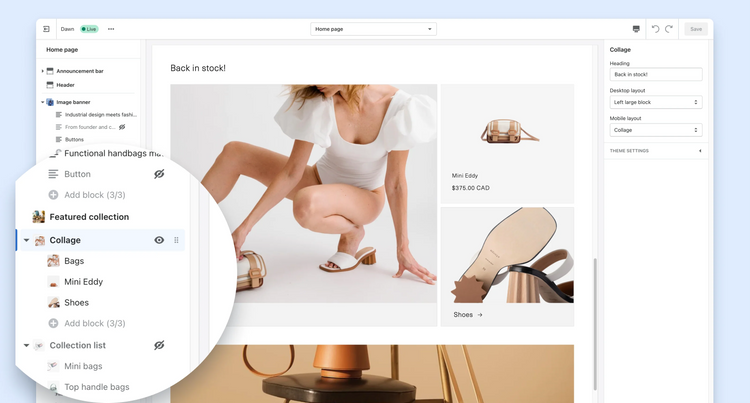
Any online store needs to stay up-to-date with the latest trends in the ever-evolving world of e-commerce. At the Shopify Unite 2021 conference, one of Shopify's most significant updates to date was announced: Themes Online Store 2.0, also known as Shopify 2.0. This update has had a major impact on how online stores are created and managed. In this post, we'll discuss how these updates can benefit your business.
What is Shopify Online Store 2.0?
Shopify Online Store 2.0 is a Shopify update that, since 2021, has changed the Shopify user experience by adding a new theme architecture and advanced customization options. It now offers greater flexibility and control to personalize your online store.
You might be interested in : Why is it important to optimize your online store?
How to know which version you are using
If you're unsure which version of Shopify you're using, there are several ways to find out. The most reliable method is to review your store's code.
Follow these instructions:
- Log in to your Shopify account.
- Click on "Online Store" and then "Themes".
- Select "Actions" and then "Edit Code".
- Open the "Config." folder and click on "settings_schema.json". This file contains information about the theme version.
There are other ways to verify your version, such as:
- If your theme was created before June 2021 and has not been updated, you are probably using Shopify 1.0.
- Within the theme customizer, check if you can add app sections. If so, you're using Shopify 2.0.

Key Features of Shopify Online Store 2.0
Sections Everywhere
The ability to change, add, or remove sections anywhere on your website—whether on product pages, collections, custom pages, or blog posts—is one of the standout features of Shopify 2.0. This allows you to change the look and feel of your online store without needing any technical expertise.
Improved application integration
Shopify 2.0 users can easily integrate apps, extensions, and widgets into their applications. Most of these app integrations are handled through the theme editor, giving you complete control over where these apps appear on the page.
Improvements to the Theme Editor interface
Shopify 2.0 improved the user interface to make it easier to navigate, make changes, and edit your website.
Custom configuration with Liquid
This feature allows you to make specific customizations to your online store using the Liquid programming language. This means that if you're using Shopify 2.0, you'll be able to access and change specific elements in your online store and pages directly from the theme editor.
Native Metafields
If you're using Shopify 2.0, you can now add metafields directly through the theme editor, making the process easier and improving performance. Furthermore, metafields now support a variety of file types, including PDFs, images, video links, and product listings.
Versatile Content
Shopify 2.0 users can connect dynamic data feeds to their theme sections, enabling dynamic content experiences tailored to products, collections, blog posts, and more.
You might be interested in: Discover the advantages of using Shopify for your online store.

Benefits of Shopify Online Store 2.0
The features of Shopify Online Store 2.0 combine to offer several advantages for business owners, agencies, and end users:
Improved speed and performance
Shopify 2.0 websites load over 35% faster compared to "Vintage" Shopify stores. This performance improvement not only boosts SEO and search engine rankings but also provides a more satisfying user experience when browsing the online store.
Greater efficiency for online store owners
Managing and developing your online store is significantly simplified with the introduction of the new theme architecture in Shopify Online Store 2.0. Creation and maintenance become faster and more efficient, significantly reducing the need for coding skills.
Faster implementation of changes
The flexibility to make changes without requiring technical knowledge represents a significant time saving. Partly due to the flexibility of metafields and the ability to add sections to any page, this feature allows for the rapid incorporation of new ideas and improvements.
Creating unique online stores
Liquid's improved theme editor and customization capabilities allow you to create a unique and distinctive experience that highlights the essence of your brand and connects more effectively with your target audience.
Improved user experience
Stores built on Shopify 2.0 typically offer superior performance thanks to their optimized design. This translates into more satisfied customers, a lower bounce rate, and an increased conversion rate.
Should you update your theme to Shopify Online Store 2.0?
To take full advantage of Shopify Online Store 2.0, your current theme must be compatible with this new version. You can choose to update your existing theme to version 2.0, but in some cases, a complete redesign with a 2.0-compatible theme might be more suitable.
It's important to note that you're not required to upgrade to Shopify Online Store 2.0. If you choose not to, you'll continue to receive support from Shopify for any issues.
However, the advantages of Shopify Online Store 2.0 are very appealing, and upgrading your theme could open up great opportunities for your brand. If you feel limited by the content management capabilities of your current theme, are looking for greater flexibility, or simply want more control over your website, consider migrating or redesigning to 2.0.
You might be interested in: 7 key elements your online store should have.
What you should know before upgrading to Shopify 2.0
If you're considering upgrading your Shopify 1.0 or " Vintage " store to Shopify 2.0, here are some steps we recommend:
Essential: Back up your store in case of problems during the transition.
You can upgrade to Shopify 2.0 in several ways, depending on your needs and current situation:
- Download a Theme Online Store 2.0 from the Shopify Themes store.
- If available, download a new version of your current theme.
- If you have a custom theme, manually change the current theme.
It's important to note that you may need a developer's help to perform the update if you have a custom theme . This may require additional time and resources.
Conclusion
In conclusion, Shopify Online Store 2.0 offers a variety of features and benefits that can significantly improve your experience and that of your users in your online store. From greater customization flexibility to faster change implementation, this update has changed the way online stores are built and managed.
If you're interested in further optimizing your online store, contact us and we'll gladly offer you a free consultation!
